
Productivity · iPhone
Lantern: ADHD Planner
An ADHD planner that tells you whether today fits.
Dump what's on your mind, see your day as timeblocks with a plain verdict, and when it slips, push the rest or make it fit in one tap.
Free to download · Requires iOS 26.0 or later
Features
What Lantern: ADHD Planner does for you
Will today fit?
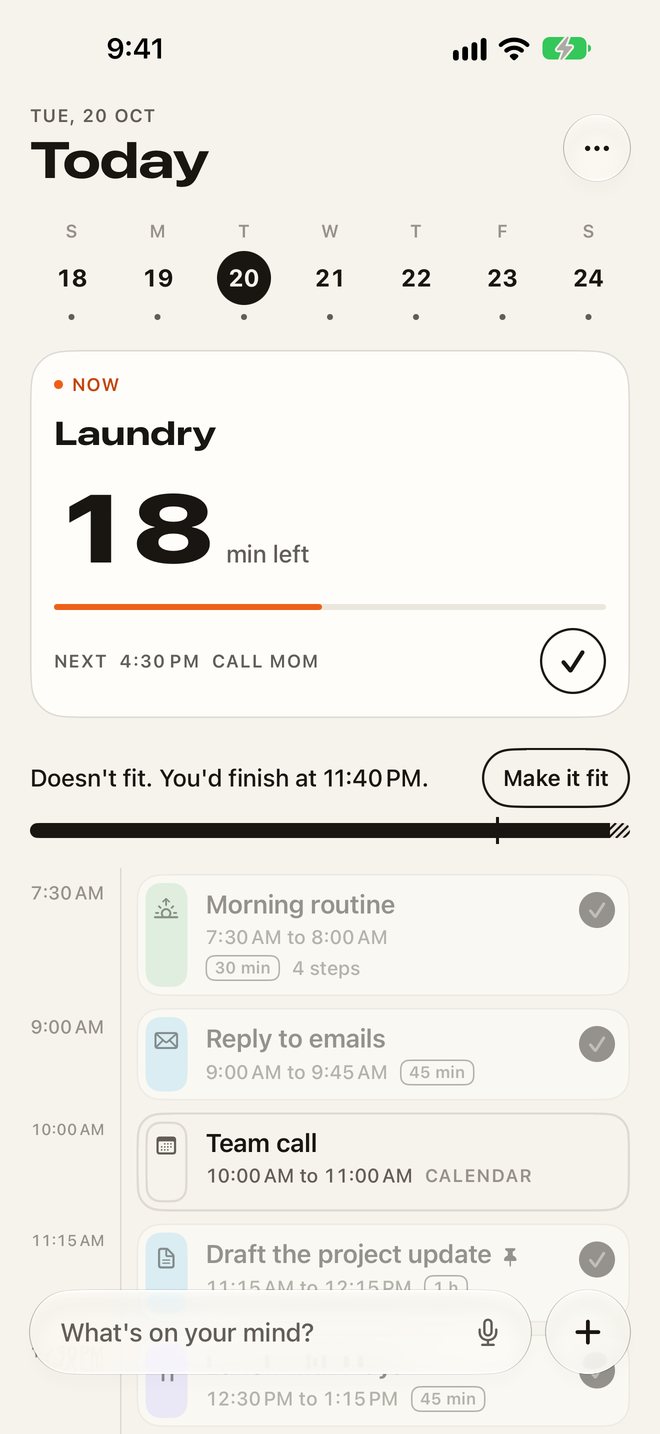
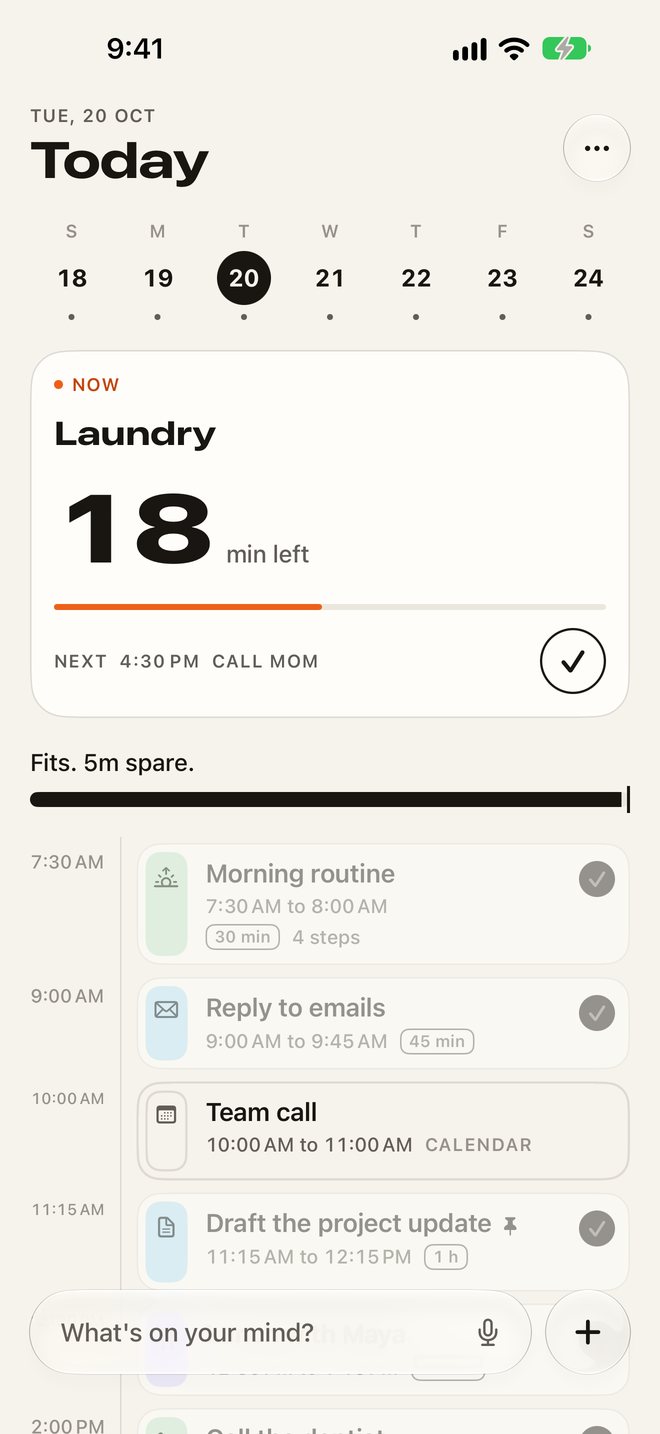
A day budget sits under your timeline: planned time, breathing room and what's left before you wind down. It says it straight, like "Fits. 40m spare." or "Doesn't fit. You'd finish at 11:40 pm."
Make it fit
One tap moves the latest blocks that can move to tomorrow and shows the new finish time before you say yes. Musts and calendar events never move.
Brain dump
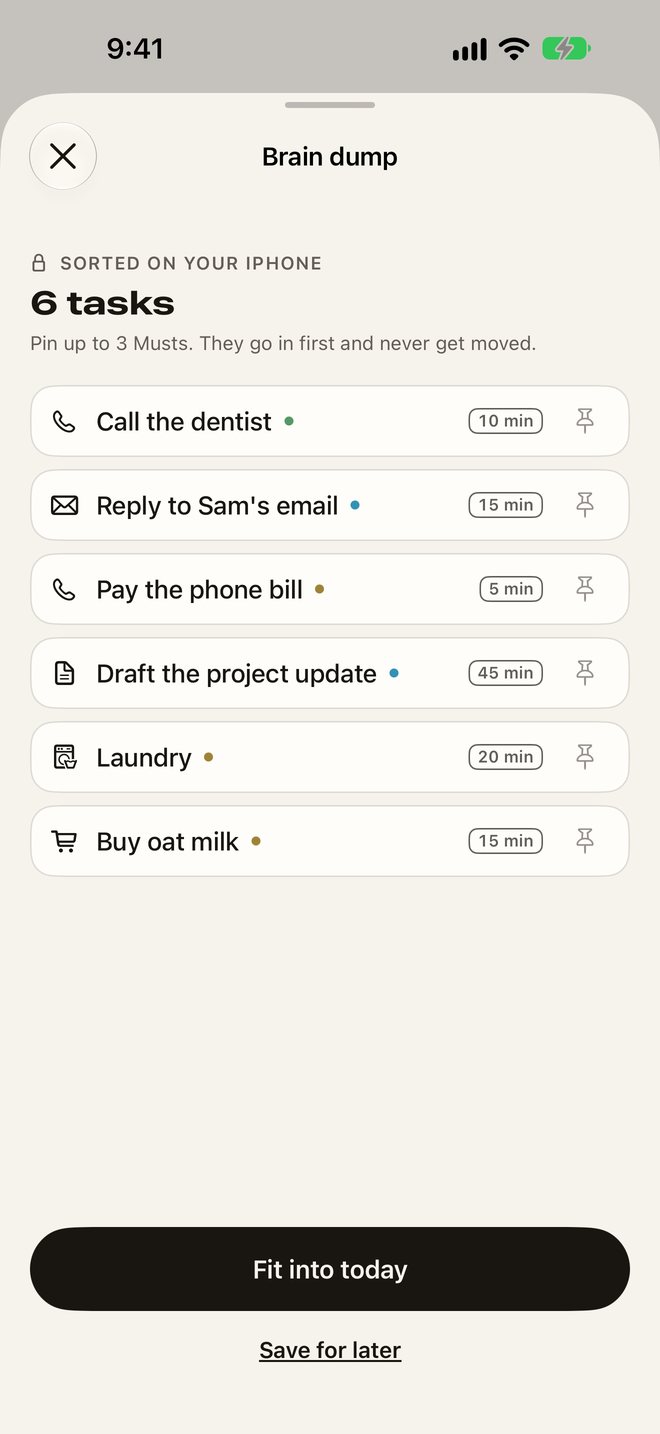
Type or dictate everything on your mind in one messy note. Lantern splits it into tasks with a guessed length and fits them into the free gaps of your day. Sorting runs on your iPhone, and Simple sort is free and unlimited.
Running late? Push the rest
Pick 5, 15 or 30 minutes and every block after now moves together. The Running late control in Control Center does it without opening the app.
Now and next, at a glance
The Now card counts down the minutes left in the block you're in. Widgets on the Home Screen, Lock Screen and in StandBy, plus a Live Activity, keep now and next in sight.
Routines that run themselves
Mornings and evenings as steps, each with its own timer. The player moves on when a step is done and tells you when you'll finish.
How it works
Up and running in a minute
- 1
Say what's on your mind
Type a few things, or tap a suggestion like Laundry. Lantern sorts them into blocks with a guessed length.
- 2
Set when your day winds down
Lantern plans up to that time, so it can tell you whether the day fits.
- 3
See today, and make it fit
Your blocks are laid out with a plain verdict. If it doesn't fit, one tap moves what can wait to tomorrow.
About
Why we built Lantern: ADHD Planner
ADHD planners tend to fail in the same few ways, and their reviews say so. They let you plan a day that could never fit, then leave you to find out at 9 pm. One late start ruins the whole plan, because every block has to be moved by hand. And thoughts that pop up have nowhere to go.
Lantern was built around those complaints. Under your timeline sits a day budget with a plain verdict, so you know at a glance whether today fits. When it doesn’t, one tap moves what can wait to tomorrow. A brain dump turns the mess in your head into blocks with a guessed length, and when the day slips, Running late pushes the rest while Musts and calendar events stay put.
It is a planner, not a treatment. There is no account and no chatbot, your plans stay on your iPhone, and the core is free.
Pricing
Simple, upfront pricing
Today timeline and day budget, Make it fit, Running late, 3 smart sorts a day plus unlimited Simple sort, 1 routine, gentle and standard alerts, calendar events, the Now widget and both controls.
Monthly
$6.99 per month
Yearly
$34.99 per year
Lifetime
$69.99 one-time purchase
Includes a 7-day free trial. Subscriptions renew automatically unless cancelled at least 24 hours before the end of the period. Cancel any time in Settings › Apple ID › Subscriptions. Prices are in US dollars and may vary by country.
Free tool
- Will today fit? Paste your to-do list with rough times and get a plain answer: it fits, or it doesn't, and what to move to tomorrow.
Questions, answered
Is Lantern free?
Yes, the core is free: the Today timeline and day budget, Make it fit, Running late, Easy days, 3 smart sorts a day plus unlimited Simple sort, 1 routine, gentle and standard alerts, calendar events, the Now widget and both controls. Lantern Pro adds unlimited smart sorts and routines, alerts that keep going and alarms, the Live Activity, the Today and StandBy widgets, the week view, Time truth and extra app icons: $34.99 a year with a 7-day free trial, $6.99 a month, or $69.99 once.
Is there a lifetime option?
Yes. Lantern Pro Lifetime is a one-time purchase of $69.99, with no subscription.
Will I be charged when the trial ends?
Only if you keep it. Lantern reminds you 2 days before the 7-day trial ends, and you can cancel any time before then in Settings.
Is my brain dump sent anywhere?
No. On iPhones with Apple Intelligence, the brain dump is sorted by Apple's on-device model. On other iPhones, or with Smart sort off, Lantern splits it line by line. Either way the text stays on your phone and is never sent to us.
Does it work with my calendar?
Lantern can show your calendar events on the timeline so you can plan around them. It only reads them, never changes them, and Make it fit and Running late never move them.
What happens when I fall behind?
Tap Running late and pick 5, 15 or 30 minutes, or tap Make it fit to move what can wait to tomorrow. Musts and calendar events stay put.
Is Lantern a treatment for ADHD?
No. Lantern is a planner, not a medical app, and it does not diagnose or treat anything. If you have questions about ADHD itself, talk to a doctor or a local health service.
Which iPhones does it work on?
Lantern needs iOS 26. Smart sort with Apple's on-device model needs an iPhone with Apple Intelligence; other iPhones use Simple sort.
How do I cancel?
Open the Settings app, tap your name, then Subscriptions, then Lantern, and cancel. You keep Pro until the end of the period you paid for.
Still stuck? Visit Lantern: ADHD Planner support. We answer every email.